Tuesday, 25 August 2015

Hadoop Interview Questions – HDFS

Q1. What is Hadoop?
Ans. Hadoop is free java based programming framework. It supports big data processing with distributed computing environment. 
Q2. Who is the provider of Hadoop?
Ans. Hadoop forms part of Apache project provided by Apache Software Foundation. 
Q3. What is the use of Hadoop?
Ans. With Hadoop the user can run applications on the systems that have thousands of nodes spreading through innumerable terabytes. Rapid data processing and transfer among nodes helps uninterrupted operation even when a node fails preventing system failure. 
Q4. What are the operating systems on which Hadoop works?
Ans. Windows and Linux are the preferred operating system though Hadoop can work on OS x and BSD. 
Q5. What is meant by Big Data?
Ans. Big Data refers to assortment of huge amount of data which is difficult capturing, storing, processing or reprieving. Traditional database management tools cannot handle them but Hadoop can. 
Q6. Can you indicate Big Data examples?
Ans. Facebook alone generates more than 500 terabytes of data daily whereas many other organizations like Jet Air and Stock Exchange Market generates 1+ terabytes of data every hour. These are Big Data. 
Q7. What are major characteristics of Big Data?
Ans. The three characteristics of Big Data are volume, velocity, and veracity. Earlier it was assessed in megabytes and gigabytes but now the assessment is made in terabytes. 
Q8. What is the use of Big Data Analysis for an enterprise?
Ans.  Analysis of Big Data identifies the problem and focus points in an enterprise. It can prevent big losses and make profits helping the entrepreneurs take informed decision. 
Q9. What are the characteristics of data scientists?
Ans. Data scientists analyze data and provide solutions for business problems. They are gradually replacing business and data analysts. 
Q10. What are the basic characteristics of Hadoop?
Ans. Written in Java, Hadoop framework has the capability of solving issues involving Big Data analysis. Its programming model is based on Google Mapreduce and infrastructure is based on Google’s Big Data and distributed file systems. Hadoop is scalable and more nodes can be added to it. 
Q11. Which are the major players on the web that uses Hadoop?
Ans. Introduce in 2002 by Doug Cutting, Hadoop was used in Google MapReduce and HDFS project in 2004 and 2006. Yahoo and Facebook adopted it in 2008 and 2009 respectively. Major commercial enterprises using Hadoop include EMC, Hortonworks, Cloudera, MaOR, Twitter, EBay, and Amazon among others. 
Q12. How is Hadoop different from traditional RDBMS?
Ans. RDBMS can be useful for single files and short data whereas Hadoop is useful for handling Big Data in one shot. 
Q13. What are the main components of Hadoop?
Ans. Main components of Hadoop are HDFS used to store large databases and MapReduce used to analyze them. 
Q.14. What is HDFS?
Ans. HDFS is filing system use to store large data files. It handles streaming data and running clusters on the commodity hardware. 
Q15. What are the main features of HDFS>
Ans. Great fault tolerance, high throughput, suitability for handling large data sets, and streaming access to file system data are the main features of HDFS. It can be built with commodity hardware. 
Q16. Why replication is pursued in HDFS though it may cause data redundancy?
Ans. Systems with average configuration are vulnerable to crash at any time. HDFS replicates and stores data at three different locations that makes the system highly fault tolerant. If data at one location becomes corrupt and is inaccessible it can be retrieved from another location. 
Q17. Would the calculations made on one node be replicated to others in HDFS?
Ans. No! The calculation would be made on the original node only. In case the node fails then only the master node would replicate the calculation on to a second node. 
Q18. What is meant by streaming access?
Ans. HDFS works on the principle of “write once, read many” and the focus is on fast and accurate data retrieval. Steaming access refers to reading the complete data instead of retrieving single record from the database. 
Q19. What is meant by ‘commodity hardware’? Can  Hadoop work on them?
Ans. Average and non-expensive systems are known as commodity hardware and Hadoop can be installed on any of them. Hadoop does not require high end hardware to function. 
Q20. Which one is the master node in HDFS? Can it be commodity?
Ans. Name node is the master node in HDFS and job tracker runs on it. The node contains metadata and works as high availability machine and single pint of failure in HDFS. It cannot be commodity as the entire HDFS works on it. 
Q21. What is meant by Data node?
Ans. Data node is the slave deployed in each of the systems and provides the actual storage locations and serves read and writer requests for clients. 
Q22. What is daemon?
Ans. Daemon is the process that runs in background in the UNIX environment. In Windows it is ‘services’ and in DOS it is ‘TSR’. 
Q23. What is the function of ‘job tracker’?
Ans. Job tracker is one of the daemons that runs on name node and submits and tracks the MapReduce tasks in Hadoop. There is only one job tracker who distributes the task to various task trackers. When it goes down all running jobs comes to a halt. 
Q24. What is the role played by task trackers?
Ans. Daemons that run on What data nodes, the task tracers take care of individual tasks on slave node as entrusted to them by job tracker. 
Q25.What is meant by heartbeat in HDFS?
Ans. Data nodes and task trackers send heartbeat signals to Name node and Job tracker respectively to inform that they are alive. If the signal is not received it would indicate problems with the node or task tracker. 
Q26. Is it necessary that Name node and job tracker should be on the same host?
Ans. No! They can be on different hosts. 
Q.27. What is meant by ‘block’ in HDFS?
Ans.  Block in HDFS refers to minimum quantum of data for reading or writing. Default block size is 64 MB in HDFS. If a file is 52 MB then HDFS would store it and leave 12 MB empty and ready to use. 
Q.28. Can blocks be broken down by HDFS if a machine does not have the capacity to copy as many blocks as the user wants?
Ans.  Blocks in HDFS cannot be broken. Master node calculates the required space and how data would be transferred to a machine having lower space. 
Q.29. What is the process of indexing in HDFS?
Ans. Once data is stored HDFS will depend on the last part to find out where the next part of data would be stored. 
Q.30. How a data node is identified as saturated?
Ans. When a data node is full and has no space left the name node will identify it. 
Q31. What type of data is processed by Hadoop?
Ans. Hadoop processes the digital data only. 
Q32. How Name node determines which data node to write on?
Ans. Name node contains metadata or information in respect of all the data nodes and it will decide which data node to be used for storing data. 
Q33. Who is the ‘user’ in HDFS?
Ans. Anyone who tries to retrieve data from database using HDFS is the user. Client is not end user but an application that uses job tracker and task tracker to retrieve data. 
Q.34. How the client communicates with Name node and Data node in HDFS?
Ans. The communication mode for clients with name node and data node in HDFS is SSH. 
Q.35. What is a rack in HDFS?
Ans. Rack is the storage location where all the data nodes are put together. Thus it is a physical collection of data nodes stored in a single location.

Monday, 17 August 2015

Differences between Hadoop1.0 & Hadoop 2.0

Early adopters of the Hadoop ecosystem were restricted to processing models that were MapReduce-based only. Hadoop 2 has brought with it effective processing models that lend themselves to many Big Data uses, including interactive SQL queries over big data, analysis of Big Data scale graphs, and scalable machine learning abilities. The evolution of Hadoop 1's limited processing model comprising of various batch-oriented MapReduce tasks, to the more specialized and interactive hard-core models of Hadoop 2 ,have now showcased the potential value contributed by distributed and large scale processing systems. Read on to note the major differences that exist between Hadoop 1 and 2. 

Hadoop--YARN and HDFS 

While other available solutions are likely to be unsuitable for interactive analytics; are I/O intensive; constrained with respect to providing graph support, memory intensive algorithms, and other machine learning processes; and more; Hadoop proves to be far ahead in the race. Creating a reliable, scalable and strong foundation for Big Data architectures, the Hadoop ecosystem has been positioned as one of the most dominant Big Data platforms for analytics. Here, it deserves mention that Hadoop developers had rewritten major components of the Hadoop 1 file system for producing Hadoop 2. The resource manager YARN and HDFS federation were introduced as important advances for Hadoop 2.  

HDFS-- Hadoop file system with a difference

HDFS, a popular Hadoop file system, comprises of two main components: blocks storage service and namespaces. While the block storage service deals with block operations, cluster management of data nodes, and replication; namespaces manage all operations on files/ directories, especially with regards to the creation and modification of files and directories.

A single Namenode was responsible for managing the complete namespace for Hadoop clusters in Hadoop 1. With the advent of the HDFS federation, several Namenode servers are being used for the management of namespaces. This in turn allows for performance improvements, horizontal scaling, and multiple namespaces. All in all, the implementation of HDFS makes existing Namenode configurations operate without changes. A shift to the HDFS federation requires Hadoop administrators to format Namenodes, and update the same for  use with latest Hadoop cluster applications. It also involves the addition of more Namenodes to the Hadoop cluster.

YARN—Supports additional performance enhancements for Hadoop 2

While the HDFS federation is responsible for bringing in measures of reliability and scalability to Hadoop, YARN brings about significant performance enhancements for certain applications; implements an overall more flexible execution engine; and offers support for additional processing models. As a recap, do know that YARN, a resource manager, was developed as a result of the separation of the resource management capabilities and processing engine of MapReduce; as implemented in Hadoop 1.

Oft referred to as the operating system of Hadoop due to its role in managing and monitoring diverse workloads, implementing security controls, maintaining multi-tenant environs, and managing all high availability Hadoop features, YARN is designed for diverse, multiple, user applications that operate on a given multi-tenant platform. In addition to MapReduce, YARN supports other multiple processing models too. 

High Availability Mode (HA) of Namenode

The name node stores all metadata in the Hadoop Cluster. It’s extremely important because in case of events such as an unprecedented machine crash, it can bring down the entire Hadoop cluster. Hadoop 2.0 offers a solution for the problem on hand. Now, the High Availability feature of HDFS comes to the rescue by allowing any of the two redundant name nodes to run in the same cluster. These name nodes may run in any given active/passive way—with one operating as the primary name node, and the other as a hot standby one. 

Both these name nodes share an edits log, wherein all changes are collected in shared NFS storage. At any point of time, only a single writer is allowed to access this shared storage. Here, the passive name node is also allowed access to the storage and is responsible for keeping all updated metadata information with respect to the cluster. If an active name node fails to function, the passive name node takes over as the active one and starts writing onto the shared storage.

Enhanced Utilization of Resources
In case of Hadoop 1.0, the JobTracker held the dual responsibility of driving the accurate  execution of MapReduce jobs, and also managing the resources dedicated to the cluster. With YARN coming to the scene, two major functionalities attributed to the overburdened JobTracker-- job scheduling/monitoring and resource management, are split up into separate daemons. These are:

A Resource Manager (RM) that lays focus upon the management of cluster resources;

An Application Master (AM), which is typically a one-per-running-application that manages individual running applications; for instance, MapReduce jobs. 

It is essential to note that there exists no more non-flexible map-reduce slots. With YARN as the central resource manager, multiple applications  can now share a common resource and run on Hadoop. 

Batch Oriented application
In its 2.0 version, Hadoop goes much beyond its batch oriented nature and runs interactive applications, along with streaming them too. 
Native Windows Support
Originally, Hadoop was developed for supporting the UNIX family that was linked with operating systems. With Hadoop 2.0 that offers native support for the Windows operating system, the reach of Hadoop has extended significantly. It now caters to the ever-growing Windows Server market with flair.

Non MapReduce Applications on Hadoop 2.0
Hadoop 1.0 was compatible with MapReduce framework tasks only; they could process all data stored in HDFS. Other than MapReduce, there were no more models for data processing. For things such as graph or real-time analysis of the data stored in HDFS, users had to shift the data to other alternate storage facilities like HBase. YARN helps Hadoop run non-MapReduce applications too. YARN APIs can be used for writing on other frameworks and running on top of HDFS. This helps the running of different non-MapReduce applications on Hadoop—with MPI, Giraph, Spark, and HAMA being some applications that are well-ported for running within YARN.

Data node caching for faster access
Hadoop 2.0 users and applications of the likes of Pig, Hive, or HBase are capable of identifying different sets of files that require caching. For instance, the dimension tables related to Hive can now be configured for data caches linked to the DataNode RAM; thereby allowing faster reads for Hive related queries to most frequently looked up tables.

HDFS- Multiple Storage

Another important difference between Hadoop 1.0 vs. Hadoop 2.0 is the latter’s support for all kinds of heterogeneous storage. Whether it’s about SSDs or spinning disks, Hadoop 1.0 is known to treat all storage devices as a single uniform pool on a DataNode. So, while Hadoop 1.0 users could store their data on an SSD, they were in no position to control the same. Heterogeneous storage serves to be an integral part of Hadoop’s version of 2.0 and onwards. The approach is quite general and permits users to treat memory as storage tiers for temporary and cached data.

HDFS Snapshots
Hadoop 2.0 offers additional support and compatibility for file system snapshots. They are point-in-time images of complete file system or the sub trees of a specific file system. The many uses of snapshots include:

Protection for user errors: An admin-driven process can be set up for taking snapshots periodically. So, if users happen to delete files accidentally, the lost data is capable of being restored from the snapshots containing the same.
Reliable backups: Snapshots of entire file systems or sub-trees in the file system can be used by the admin as a beginning point for full backups. There’s a scope of taking incremental backups by copying down the differences between any two given snapshots.
Disaster recovery: Snapshots may also be used for the copying of point-in-time images to remotely placed sites for disaster recovery.

Thursday, 16 July 2015

Hadoop with R

R and Hadoop

Introduction

Apache Hadoop provides a robust and economic platform for storing and process big data. R programming language is used by many data analysts for statistical analysis. In this article, I talk about putting these two together to form a powerful platform for big data analysis.

Apache Hadoop


Apache Hadoop has become synonymous with Big Data. Nobody talks about Big Data without doing something with Hadoop.  Hadoop helps to complete your job faster by distributing the computations to a cluster of commodity machines. This makes it possible for organizations to cut their data management costs by as much as 90% and yet build a fault-tolerant data processing system.
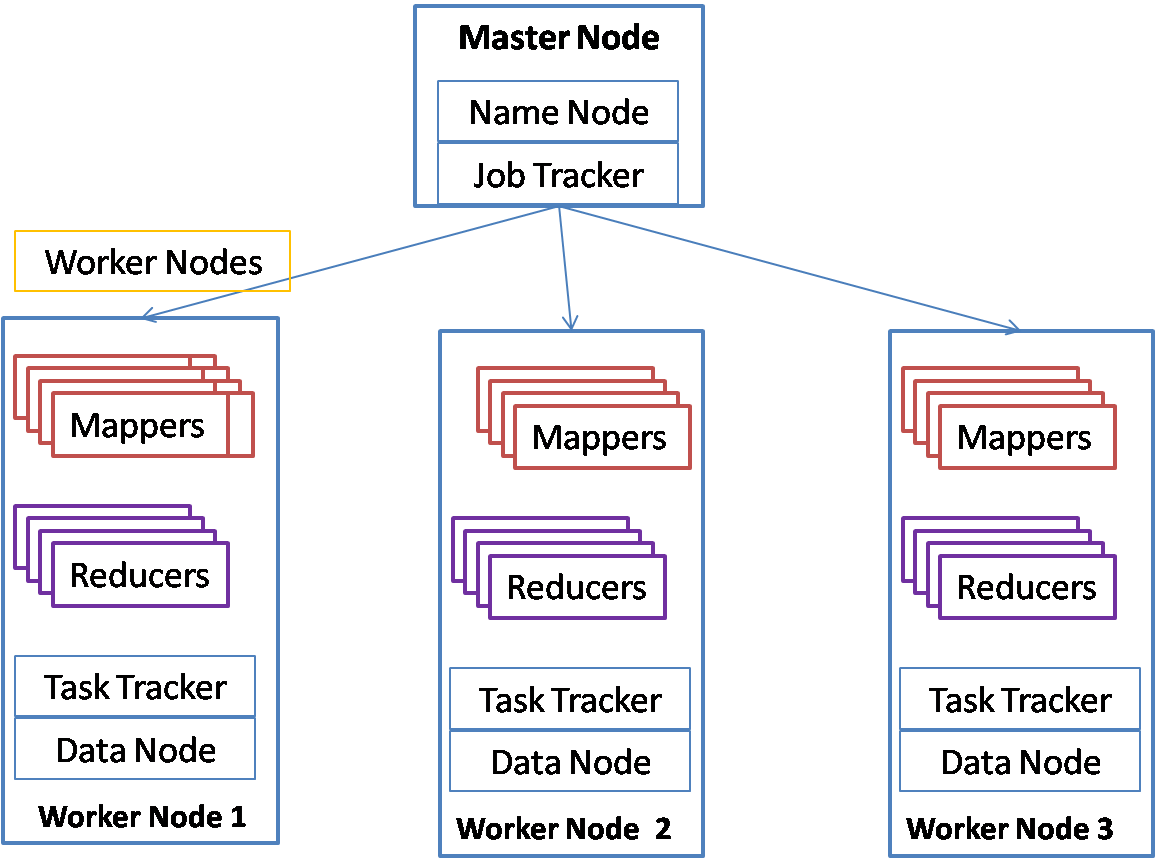
Hadoop has two core components, HDFS for distributed storage and Mapreduce for distributed processing. The hadoop architecture can be represented by the below diagram.


Hadoop Architecture
Hadoop Architecture

Hadoop cluster consists of two types of nodes (or machines). There is one master node and multiple worker nodes. Name node and data node are processes that are part of HDFS, Hadoop distributed file system. Job tracker and Task tracker are part of Map reduce – the distributed processing system of hadoop. User jobs are divided into two types of tasks, mappers and reducers. Mappers do the filtering of data and convert the data into key value pairs. Reducers process each key and produce an aggregated output. Mappers take the input from HDFS and store their output in local file system. Reducers get the output of mappers and store the final output in HDFS. Since all mappers and reducers have a share nothing architecture, hadoop provides a very highly scalable parallel processing architecture.

R Programming language

R programming language has been used for statistical computing. With the increased interest in data analytics, usage of R has increased significantly. It is estimated that more than 70% of the data scientists use R for statistical analysis. R is an opensource product and is free. It is supplied as part of the GNU public license. R has outperformed many of the expensive and paid products for statistical processing. The R language itself is easy to learn and provides many libraries that provide functions to model and analyze data. R also provides extensive libraries for prediction as well as machine learning.
R provides many built in functions for machine learning as well as prediction modeling. One of my favorite is Holt-Winters model that provides time series modeling of data with some randomness, trend as well as seasonality. It is also called the triple exponential model. For example ,if you have data in a file  that has a single column as sales per day for the last five years for a particular store, then you can build a Holt Winters model like below:
>salesTS <- ts(sales,frequency=52,start=c(2010,1))
>hw<-HoltWinters(salesTS, seasonal=”add”, alpha=0.3,beta=0.2,gamma=12)
>p<-predict(hw,8,prediction.interval=TRUE)
>plot(p)
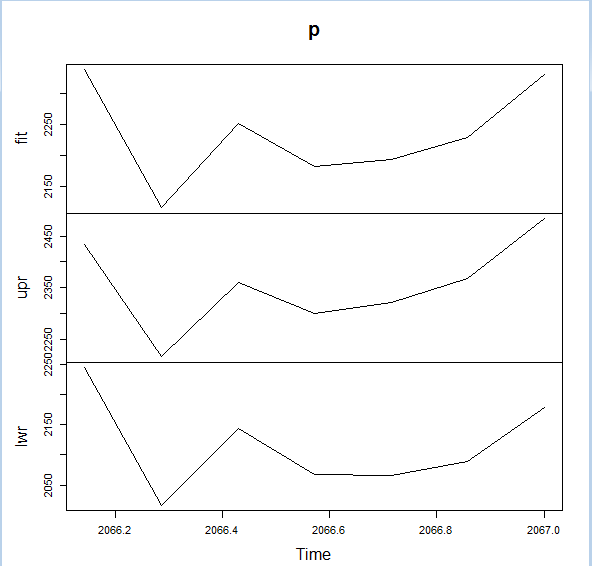
You will get the graph like below which gives the 8 future points along with upper and lower bounds:


Prediction plot of R
R Prediction plot

R-Hadoop

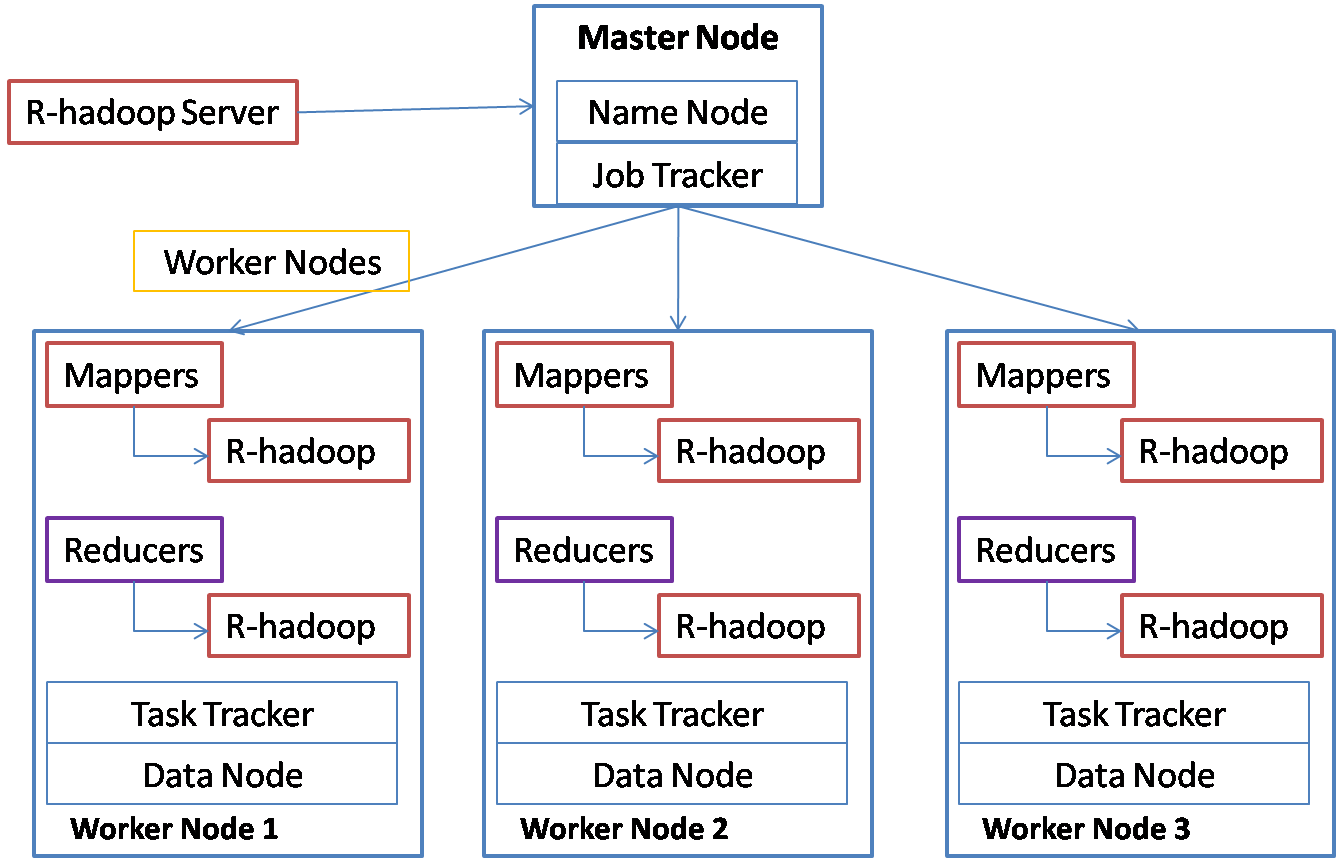
Now, can we put the power of hadoop and convenience of R together? R-hadoop is one such attempt. You write your mapper and reducer functions in R and the jobs are submitted to Hadoop which in turn distributes the work to R running on each machine in the cluster. The architecture can be represented in the below diagram:


R-Hadoop Architecture

You can initiate your map-reduce job through the R-hadoop server.  R-hadoop server submits the job to Job Tracker. Job tracker schedules the map and reduce tasks on task trackers running on each worker node. The map and reduce tasks execute the tasks by running the mapper code on the R-hadoop on the worker node. The R-hadoop mapper gets the input as keys and values, processes the data and stores them again as keys and values for the reducer. The reducer task collects the keys and values and calls the reduce function on R-hadoop for each key with a list of values. R-hadoop does not parallelize the algorithm itself. It distributes the work so that keys and values are distributed. Suppose you have to execute the above prediction for 200 stores and for each store it takes 10 minutes, then you can distribute this work on your hadoop cluster so that all the 200 stores can be processed within an hour.

Installation and setup

Though R-hadoop is not difficult to setup, it takes lot of trial and error to make it work properly.  Following steps need to be followed to set this up correctly:
On each machine in the cluster:
  1. Do a package installation of R (on Ubuntu, you can add the line deb http://ftp.osuosl.org/pub/cran/bin/linux/ubuntu precise/
to /etc/apt/sources.list and then use apt-get to install r-base and r-base-dev)
2. Start R with sudo R and add the following packages:
(“codetools”, “Rcpp”,”plyr”,”stringi”,”magrittr”,”stringr”,”reshape2″,”caTools”,”functional”, “digest”, “RJSONIO”)
  1. Quit to Linux command line and download the rmr package from any of the mirrors. Following is one of the mirrors:
wget http://github.com/RevolutionAnalytics/rmr2/releases/download/3.3.1/rmr2_3.3.1.tar.gz
  1. Install the package using the below command:
sudo R CMD INSTALL rmr2_3.3.1.tar.gz

If it throws up any errors that some package is missing or outdated, reinstall that package and try again.
Following steps need to be executed on the master node only:
  1. Install R studio server on the master node. I found following instructions for installing R studio server that is very useful:
sudo apt-get install gdebi-core
sudo gdebi rstudio-server-0.99.464-i386.deb

This automatically starts Rstudio server, so after we make the configuration changes, you will have to restart the server.
6. This is an important step for connecting the server to hadoop. Find out your hadoop installation path and hadoop streaming jar file and set two environment variables as below:
Edit the/etc/R/Renviron.site file and add the below lines at the end:
#following required for R-Hadoop
HADOOP_CMD=/usr/local/hadoop/bin/hadoop
HADOOP_STREAMING=/usr/local/hadoop/contrib/streaming/hadoop-streaming-1.2.1.jar
Your hadoop path and jar file may be different based on your hadoop version.
7. Now you need to restart Rstudio server for above changes to take effect:
sudo rstudio-server restart
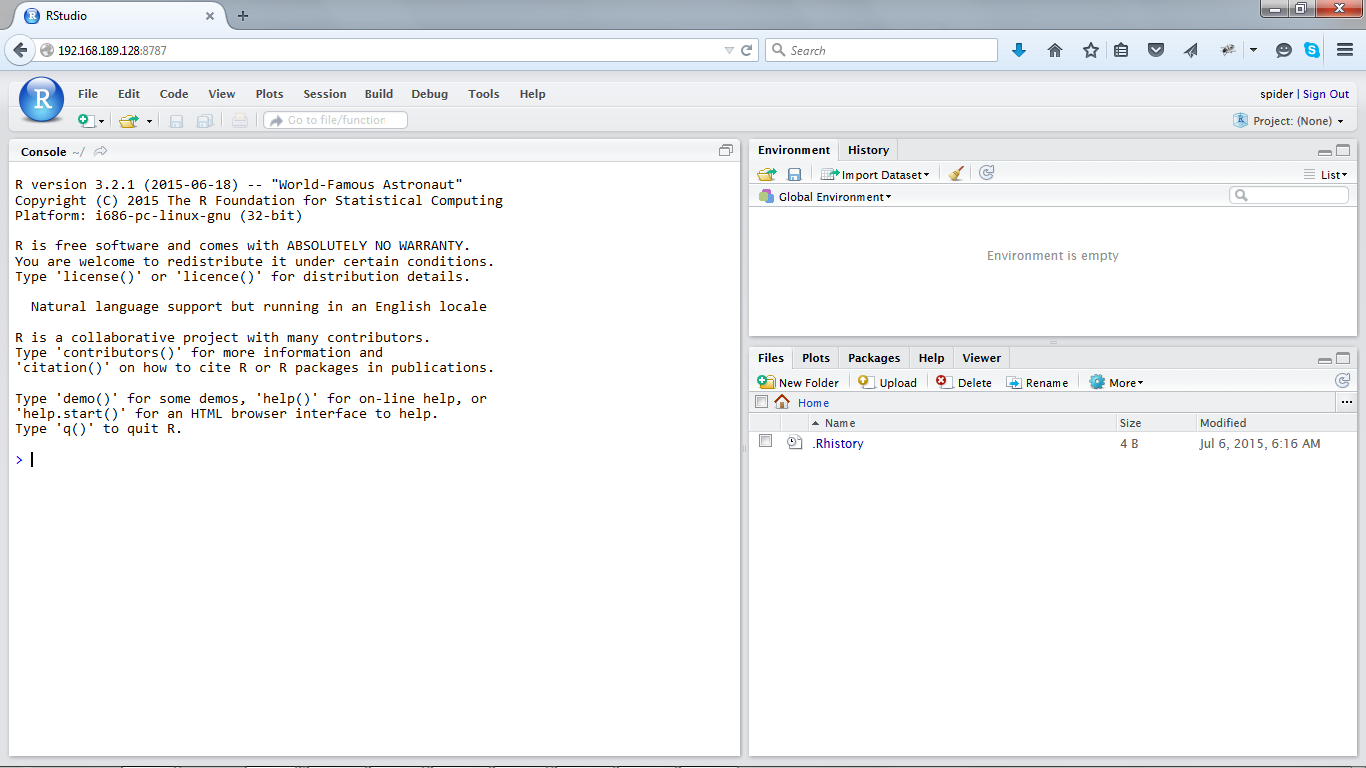
8.  You can connect to the Rstudio server from a browser on any machine with the ip address of the server machine and port 8787. I use firefox and it comes up fine. It asks for an id and password that will be a user id and password on the Linux system.
9. You will get a screen like below when you login and you are all set to use R-hadoop:


Rstudio initial screen

I have used the Linux user id spider that was created using sudo adduser spider.

Running a sample program From Rstudio

we can submit hadoop jobs from Rstudio. We need to write a mapper function and a reducer function and then call the mapreduce function in rmr2 package to submit the job to hadoop.
Step 1.
Create the input files in HDFS. I will use a file with retail sales data for multiple stores with the below format as the input file:StoreId,date of sale,total daily salesNYT1,2010-01-01,1221NYT1,2010-01-02,1206
NYT1,2010-01-03,1001
NYT1,2010-01-04,1193
NYT1,2010-01-05,1067
NYT1,2010-01-06,1077
NYT1,2010-01-07,1131
NYT1,2010-01-08,1250
NYT1,2010-01-09,1261
NYT1,2010-01-10,1009
hadoop fs –mkdir data/in
hadoop fs -put sales.csv data/in/sales.csv
Step 2.
Write the mapper in Rstudio:
library(rmr2)
mapper = function(k, line) {
line[[1]]<-lapply(line[[1]],as.character)         # <-this is to remove any factors
keyval(line[[1]],  line[[3]])                  #  <- create keyvalue pair output from mapper
}
Note that the mapper gets one input split of data as a list. So line above is not a single line but a list of lines. Since R is good a t vector processing, it makes sense not to call mapper for each line of input.
Step 3.
Write the reducer in Rstudio. We will use my favorite HoltWinters for triple exponential smoothing and prediction.
reducer = function(key, sales.list) {
# Reject  lists that are too small for the algorithm
if( length(sales.list) < 100 ) return;
valTS <-ts( as.numeric(sales.list), frequency=7,start=c(2010,1))   #<- convert to time series data
myModel<-HoltWinters(valTS, seasonal=”add”,alpha=0.3,beta=0.2, gamma=7)   #<- model using HoltWinters. Gamma represents seasonality.
predictSales<-predict(myModel,7,prediction.interval=TRUE)      #<- predict next 7 day sales with upper and lowerbounds
keyval(key, predictSales)             #output the predicted values along with key
}
 Step 4.
Finally submit the mapreduce job: mapreduce(input=”/user/spider/data/in”,          input.format=make.input.format(“csv”, sep = “,”,mode=”text”),          output=”/user/spider/data/out”,          output.format=make.output.format(“csv”, sep = “,”,mode=”text”),          map=mapper,          reduce=reducer    )
Note that absolute paths are specified for the input and output.
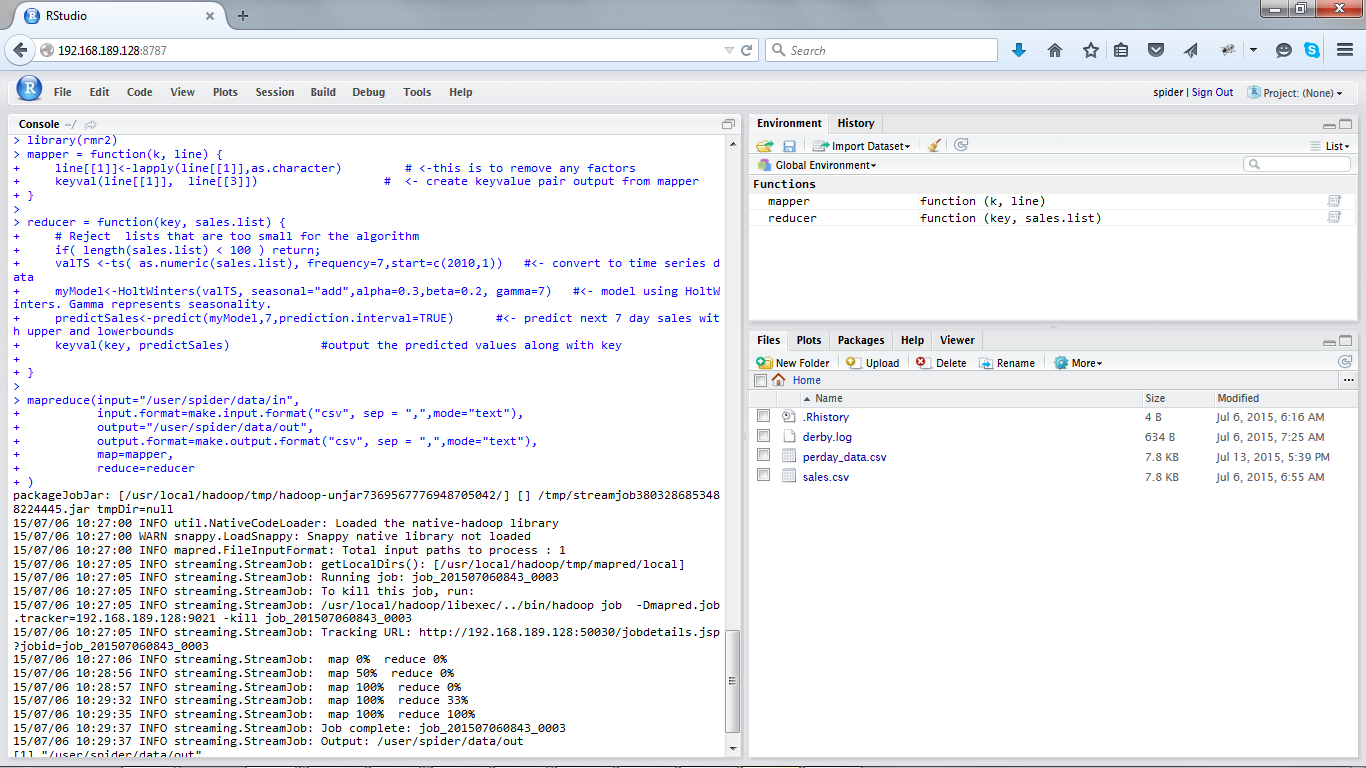
You will see mapreduce job executing like below:


Hadoop job in R
Hadoop job in R

You can check the output using hadoop. For just one store, it will look like below:
hadoop fs –cat data/out/part*
NYT1,2338.51949369753,2432.89119831428,2244.14778908078
NYT1,2116.48417153055,2216.78491253985,2016.18343052126
NYT1,2251.52104468871,2359.36936564803,2143.67272372938
NYT1,2183.65383703299,2300.62907811683,2066.67859594915
NYT1,2193.71659308069,2321.31048815327,2066.12269800812
NYT1,2228.88574017237,2368.47932443543,2089.2921559093
NYT1,2330.63829440411,2483.49715245174,2177.77943635647
The lines contain the store id, predicted value, upper bound and the lower bounds for the next 7 days. If there are multiple stores in the input, then each store will have 7 lines each.

Behind the scenes

The map reduce job is submitted to hadoop by the Rstudio server. Hadoop in turn uses the streaming jar with the mapper and reducer functions. The mapper function is run on R (Separate instance from Rstudio server) and the output key values are sent to reducer. Reducer function is run on another instance of R. The input for the reducer is consolidated from the mappers and all the key values are grouped together. Finally the reducer output is stored back into HDFS.

Advantages of R-hadoop

R-hadoop distributes your R jobs on multiple machines on the cluster. This enables parallel processing if similar R functions have to be run on multiple keys. For example if same analysis has to be done on 10000 customers of a bank, 5000 stores of a retail chain, thousands of credit card customers, millions of customer transactions etc. Though individual algorithm is not distributed, each key can be processed in parallel, leading to significant time savings.

Disadvantages of R-hadoop

Since each map or reduce task runs on separate R instances, the overhead per task is more. Also if you have an algorithm that runs on large amount of data for hours, then R-hadoop does not help in parallelization of the algorithm.

R-hadoop and EMR

EMR is the elastic map reduce service provided by Amazon Web Services. EMR allows one to provision a hadoop cluster on demand and release the resources once the job is done. EMR provides bootstrap scripts that enable you to install any required software before the mapreduce job is started. Using the bootstrap scripts, one can set up R-hadoop on the cluster including the R-server and submit the jobs automatically or through the browser. We did this for an enterprise so that they could also install graphic analysis libraries along with R and run R jobs on hadoop to get the analysis results through EMR.

Conclusion

R-hadoop is very convenient for distributing your analysis using R so that processing for multiple keys can be distributed across the cluster. Those data-scientists who are well versed with R will find it very easy to use R-hadoop. For cases where algorithm itself has to be parallelized, R-hadoop may not be useful and other alternatives like Spark machine learning library may be used.